
October 10, 2022
HTML headings are titles or subtitles that you want to display on a webpage.
Example
Heading 1
Heading 2
Heading 3
Heading 4
Heading 5
Heading 6
HTML Headings
HTML headings are defined with the <h1> to <h6> tags.
<h1> defines the most important heading. <h6> defines the least important heading.
Example
<h1>Heading 1</h1>
<h2>Heading 2</h2>
<h3>Heading 3</h3>
<h4>Heading 4</h4>
<h5>Heading 5</h5>
<h6>Heading 6</h6>Note: Browsers automatically add some white space (a margin) before and after a heading.
Headings Are Important
Search engines use the headings to index the structure and content of your web pages.
Users often skim a page by its headings. It is important to use headings to show the document structure.
<h1> headings should be used for main headings, followed by <h2> headings, then the less important <h3>, and so on.
Note: Use HTML headings for headings only. Don't use headings to make text BIG or bold.
Bigger Headings
Each HTML heading has a default size. However, you can specify the size for any heading with the style attribute, using the CSS font-size property:
Example
<h1 style="font-size:60px;">Heading 1</h1>
javascript

September 22, 2022
JavaScript Can Change HTML Attribute Values
The Light Bulb
JavaScript Can Change HTML Styles (CSS)
Changing the style of an HTML element, is a variant of changing an HTML attribute:
Example
document.getElementById("demo").style.fontSize = "35px";JavaScript Can Hide HTML Elements
Example
Hiding HTML elements can be done by changing the displays style:document.getElementById("demo").style.display = "none";JavaScript Can Show HTML Elements
Example
Showing hidden HTML elements can also be done by changing the display style:document.getElementById("demo").style.display = "block";
Html 5
September 12, 2022
HTML Introduction
HTML is the standard markup language for creating Web pages.

What is HTML?
- HTML stands for Hyper Text Markup Language
- HTML is the standard markup language for creating Web pages
- HTML describes the structure of a Web page
- HTML consists of a series of elements
- HTML elements tell the browser how to display the content
- HTML elements label pieces of content such as "this is a heading", "this is a paragraph", "this is a link", etc.
A Simple HTML Document
Example
<!DOCTYPE html>
<html>
<head>
<title>Page Title</title>
</head>
<body>
<h1>My First Heading</h1>
<p>My first paragraph.</p>
</body>
</html>Example Explained
- The
<!DOCTYPE html>declaration defines that this document is an HTML5 document - The
<html>element is the root element of an HTML page - The
<head>element contains meta information about the HTML page - The
<title>element specifies a title for the HTML page (which is shown in the browser's title bar or in the page's tab) - The
<body>element defines the document's body, and is a container for all the visible contents, such as headings, paragraphs, images, hyperlinks, tables, lists, etc. - The
<h1>element defines a large heading - The
<p>element defines a paragraph
What is an HTML Element?
An HTML element is defined by a start tag, some content, and an end tag:
<tagname> Content goes here... </tagname>
The HTML element is everything from the start tag to the end tag:
<h1>My First Heading</h1>
<p>My first paragraph.</p>
| Start tag | Element content | End tag |
|---|---|---|
| <h1> | My First Heading | </h1> |
| <p> | My first paragraph. | </p> |
| <br> | none | none |
Note: Some HTML elements have no content (like the <br> element). These elements are called empty elements. Empty elements do not have an end tag!
Web Browsers
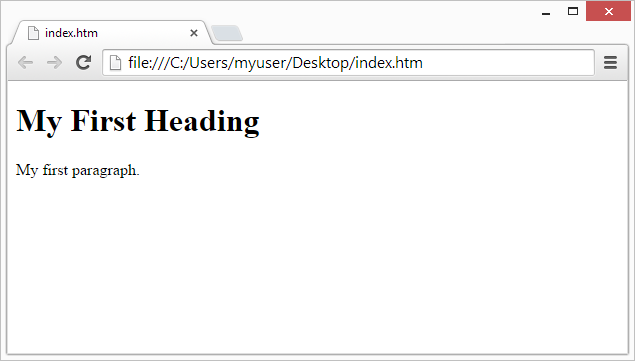
The purpose of a web browser (Chrome, Edge, Firefox, Safari) is to read HTML documents and display them correctly.
A browser does not display the HTML tags, but uses them to determine how to display the document:
HTML Page Structure
Below is a visualization of an HTML page structure:
<html>
<head>
<title>Page title</title>
</head><body></body>
</html><h1>This is a heading</h1>
<p>This is a paragraph.</p>
<p>This is another paragraph.</p>
Note: The content inside the <body> section (the white area above) will be displayed in a browser. The content inside the <title> element will be shown in the browser's title bar or in the page's tab.
Subscribe to:
Posts (Atom)

